
If you are a freelance web designer, the decision between shared hosting vs reseller hosting determines whether you operate as a busy technician or a scalable business agency. Most freelancers start by buying shared hosting accounts for every client because it is cheap and familiar. However, this “contractor” mindset creates a billing nightmare, creates security risks, and caps your revenue potential.
The truth is, the best choice isn’t just about disk space or bandwidth; it is about workflow, client retention, and profit margins. In this guide, we will compare these two hosting models specifically through the lens of a freelance business owner. You will learn how reseller hosting for web designers transforms you from a one-time builder into a recurring revenue service provider, and why sticking with standard shared hosting might be stunting your growth.
Table of Contents
Understanding the Core Difference
Before we look at the business implications, let’s quickly define the technical difference. In the debate of shared hosting vs reseller hosting, the infrastructure is often exactly the same—both usually reside on a shared server where resources like CPU and RAM are split among many users.
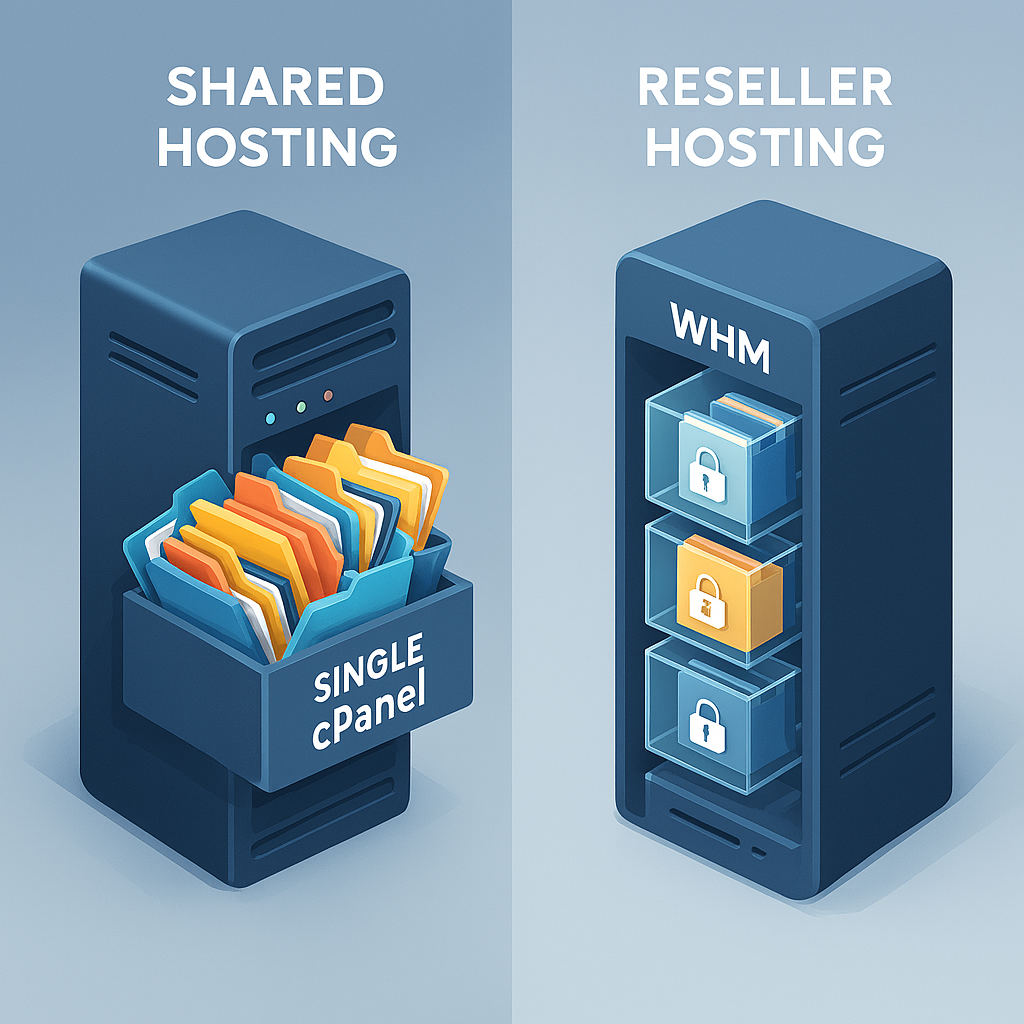
Figure 1: Visualizing the difference between isolated accounts and a master reseller environment.
The difference lies entirely in the control panel and account structure:
- Shared Hosting: You buy one cPanel account. You can host multiple domains (add-on domains), but they all live under the same file manager and the same primary login. If you give a client access, you are giving them the keys to the whole castle.
- Reseller Hosting: You get a “Master” cPanel (usually called WHM). You can create individual, isolated cPanel accounts for each client. Client A has no idea Client B exists, and you can reset Client A’s password without affecting Client B.
This technical distinction is what drives the business model change. Let’s dive into why this matters for your bottom line.
Shared Hosting for Freelancers: The “Contractor” Model
When you use a standard shared hosting plan to hosting multiple WordPress sites on one account, you are operating as a contractor. You build the site, you hand over the login credentials (or keep them and hope the client doesn’t ask), and you move on to the next project.
While this keeps initial costs low, it introduces massive shared hosting limitations for agencies:
- The “All-or-Nothing” Access Problem: If a client needs to upload a PDF or check their email, you have two bad choices. You can give them your master cPanel login (risking them accidentally deleting another client’s website), or you have to do every small administrative task yourself, becoming unpaid tech support. This administrative bloat often necessitates a robust WordPress maintenance guide to keep track of updates across these fragmented environments.
- Billing Fatigue: You have to remember to renew the hosting for every single client individually. If Client A’s credit card fails, you are chasing invoices.
- Brand Erosion: Your client logs into a dashboard filled with your hosting provider’s branding. They see the logo of a generic $3/month host, not your agency. It subconsciously devalues your work.

Figure 2: The administrative burden of managing multiple shared hosting accounts leads to burnout.
For a freelancer with just two or three portfolio sites, this is manageable. But if you want to manage 10, 20, or 50 clients, the shared hosting model breaks down.
Reseller Hosting for Freelancers: The “Service Provider” Model
Switching to the best reseller hosting for freelancers is about pivoting to a service provider model. You aren’t just designing a site; you are providing the home for it.
With a reseller package, you rent a chunk of server resources from a provider (e.g., 50GB SSD and 500GB bandwidth) and slice it up however you want. You might sell ten clients a 5GB plan.
The defining feature here is white label hosting benefits. When you create an account for a client, you can usually point them to a custom branded URL (e.g., clients.youragency.com) or use DNS nameservers that look like they belong to your company (e.g., ns1.youragency.com).
They see your logo. They pay you. They contact you for support. Even though the hardware sits in a data center owned by someone else, to the client, you are the host.
Workflow Showdown: Client Onboarding & Management
Let’s look at how the daily workflow changes when comparing cPanel reseller hosting vs shared hosting. This shift is critical when you implement a standardized client onboarding checklist.
Scenario: Onboarding a New Client
The Shared Hosting Way:
- Log into your main cPanel.
- Go to “Addon Domains” and type in the client’s domain.
- Create a new FTP user and database manually.
- Send the client a confusing welcome email explaining that their login is different for email and cPanel, and please “don’t touch the folder marked
public_html/clientb.”
The Reseller Hosting Way:
- Log into WHM (Web Host Manager).
- Click “Create a New Account.”
- Fill in the client’s domain, username, and select a predefined package (e.g., “The Business Plan”).
- Click OK.
- WHM generates a secure, unique welcome email with their specific login details and sends it automatically.
Security and Isolation Deep Dive
In the reseller model, you manage multiple client websites through a central dashboard. But beyond organization, there is a massive security advantage: Resource Isolation.
In a standard shared hosting “Add-on Domain” setup, all sites often share the same php.ini configuration and user group (often nobody or the primary user). If one client installs a vulnerable plugin, an attacker can potentially traverse directories and access the wp-config.php file of your other clients. This is known as a cross-site contamination attack.
With reselling, each client has their own isolated User ID and Group ID (e.g., clienta and clientb). The server strictly prohibits User A from reading or writing to User B’s files. This containment strategy is vital for agencies managing multiple clients, as it keeps security breaches local rather than global.

Figure 3: Reseller hosting provides isolated file systems, preventing cross-site contamination.
The Financials: Calculating Profit Margins
Is reseller hosting actually profitable? Let’s look at the math. The biggest mistake freelancers make is thinking “cheaper is better” for the client. Clients value reliability and ease. They are willing to pay a premium if you handle the headaches.
The Shared Cost Model
- Your Cost: A “Baby” shared plan might cost $10/month.
- Capacity: You can squeeze maybe 10 small sites on it.
- Risk: If you hit resource limits, all sites slow down.
- Revenue: $0. You usually pass this cost to the client or absorb it.
The Reseller Revenue Model
- Your Cost: A solid reseller plan might cost $25-$40/month for 50GB space/500GB bandwidth.
- Capacity: Let’s say you host 20 clients comfortably.
- Your Package: You create a 5GB package.
- Client Price: You charge the client $15/month for “Managed Hosting & Maintenance.”
Monthly Revenue Calculation (20 Clients):20 clients x $15/month = $300 recurring revenue
Net Profit:$300 (Revenue) - $30 (Reseller Cost) = $270 Monthly Profit
This is the power of learning how to sell hosting to web design clients. You aren’t selling them $5 server space; you are selling them peace of mind. You are selling them the knowledge that when the site goes down at 2 AM, they call you, not a toll-free number in a different timezone.
To maximize these margins, you should review specific freelance pricing strategies that bundle hosting design retainers effectively.
Technical Benchmark: Resource Limits and Performance
When evaluating shared hosting vs reseller hosting for financial viability, you must consider the technical performance implications. Shared hosting environments often operate on a “burst” resource model.
- Shared Hosting Performance: You typically have access to 1 CPU core and 512MB-1GB of RAM, but you share this with hundreds of other users. During peak traffic hours on a “neighbor” site, your site’s Time to First Byte (TTFB) can spike from 200ms to 2 seconds.
- Reseller Hosting Performance: While still on a shared physical server, reseller accounts often come with guaranteed “Entry Processes” (the number of PHP scripts running simultaneously). You can allocate specific resource caps to clients based on their needs.
For example, on a cheap shared plan, if a client hits the “Entry Process” limit (often set to 10 or 20), visitors receive a 508 Resource Limit Reached error. With a reseller account, you can monitor these usage stats in WHM and upsell a client to a VPS or higher-tier package before their site crashes, transforming technical errors into sales opportunities.
- Note: If you are developing custom applications or specific frameworks, you need to ensure compatibility. While WordPress is a standard, some apps have stricter needs. You can read more about specific compatibility issues in our guide on hosting laravel on shared hosting, which illustrates why environment isolation matters.
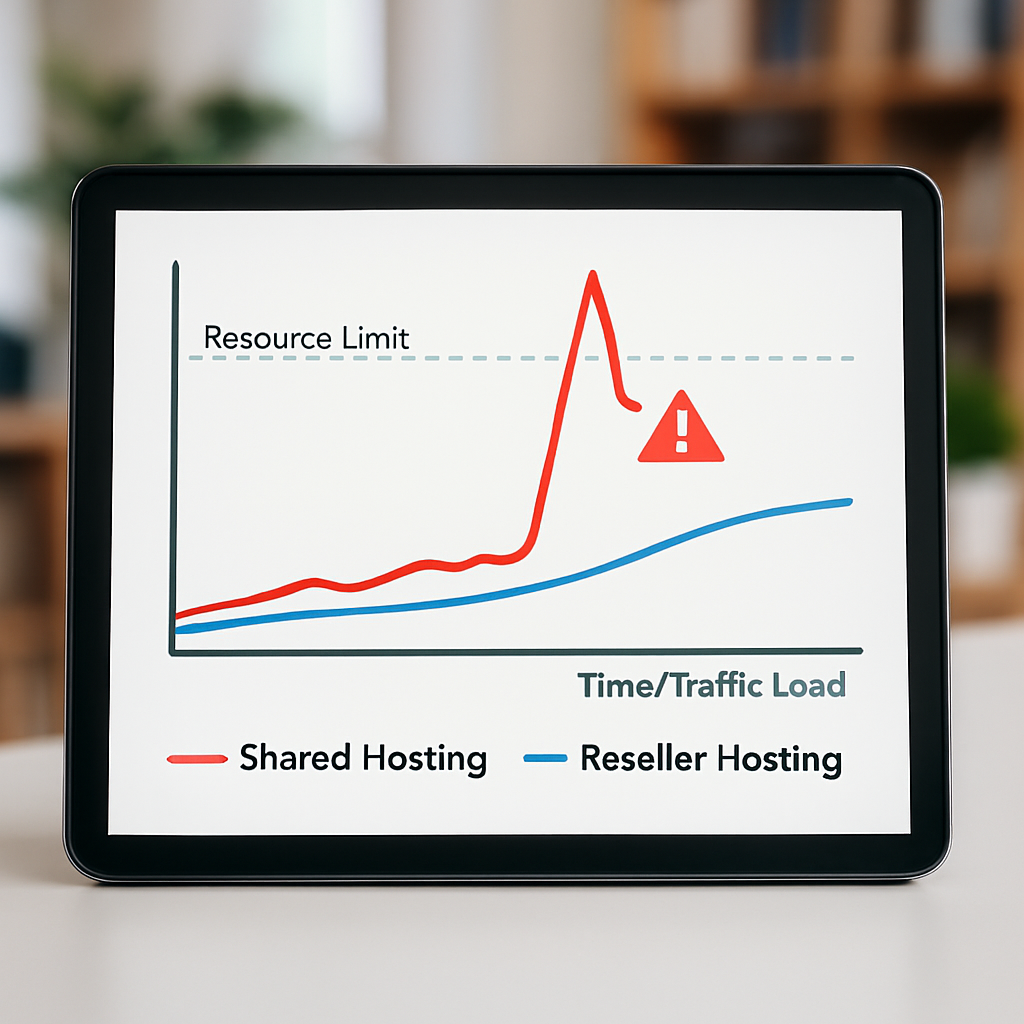
Figure 4: Graphical representation of resource throttling. Shared hosting (red) spikes and errors out, while Reseller hosting (blue) maintains stability through caps.
Brand Ownership: The Power of White-Labeling
Consider the long-term relationship with your client. If you set them up on a shared hosting account using GoDaddy, Bluehost, or HostGator, what happens when they want to make a change?
They see the logo. They google “HostGator support.” Maybe they call the host and get upsold on a service you don’t offer, or worse, get convinced to switch themes by a phone rep who doesn’t understand their business.
White label hosting benefits eliminate this competition. By using a reseller account with private nameservers, you sever the direct link between your client and the upstream provider. If the client has a server issue, they come to you. You then handle the backend provider. This makes you indispensable.
You are the single point of truth. This “stickiness” drastically improves client retention rates. According to industry benchmarks on service provider retention, clients who host with their designer are 70% more likely to renew their design maintenance contracts annually[^1].
The Exit Strategy: Selling Your Freelance Business
Eventually, you might want to sell your agency, retire, or move on to a different venture. This is where the difference between shared hosting vs reseller hosting becomes a matter of business valuation.
If you have 50 clients scattered across different shared hosting plans in your name and the client’s name, your business is a mess to unwind. You have “customer churn risk” because the relationship is tied to personal logins and third-party portals.
However, if you own a reseller hosting business, you own the platform.
- Assets: You have a centralized list of recurring revenue subscriptions.
- Portability: You can migrate the entire reseller account to a new buyer easily.
- Value: You are selling a software-as-a-service (SaaS) component attached to your design services. Buyers pay more for recurring revenue (MRR) than they do for one-off project histories.
Shared vs Reseller: Quick Comparison
| Feature | Shared Hosting (Add-on) | Reseller Hosting |
|---|---|---|
| Cost Structure | Low upfront, scales linearly & chaotically | Flat monthly fee, high ROI at scale |
| Client Access | Risky (All-or-nothing access) | Safe (Individual, isolated cPanels) |
| Branding | Host’s branding visible | White-label (Your branding) |
| Billing | Manual for each client | Automated recurring billing potential |
| Security | Neighbor effect affects all sites | Isolated environments contain threats |
| Resource Control | Shared limits, unpredictable | Ability to set per-client limits |
| Support | Client bypasses you to the host | You are the bridge; control the narrative |
| Ideal For | 1-3 personal sites/hobby projects | 5+ client sites/Agencies |
When to Stick with Shared Hosting
We have praised reseller hosting, but is shared hosting vs reseller hosting always an easy choice? No.
Stick with shared hosting if:
- You are just starting out and have zero clients.
- You are building a portfolio of your own niche sites to earn passive income via ads (not client services).
- You have only one or two “friends and family” clients who pay you in beer, not cash.
- You do not want any responsibility for server maintenance (even if the upstream provider handles it, you are still the first line of defense in reseller).
If you fit here, just get a good standard shared plan. The complexity of a reseller account (WHM) isn’t worth the overhead for 2 websites.
How to Transition to Reseller Hosting
Convinced? Here is how to move without breaking your sites.
- Purchase a Reseller Plan: Look for “cheap reseller hosting for WordPress” that includes White Label branding (private nameservers) and White-label technical support (so you don’t have to fix server errors at 3 AM).
- Create Packages: Define your tiers (e.g., Starter, Business, E-commerce). Set disk space and bandwidth limits that fit within your total allowance.
- Migrate Strategy:
* New Clients: Set them up on the reseller immediately.
* Existing Clients: Create a new cPanel for them on the reseller. Use a migration plugin (like All-in-One WP Migration) or ask your new host’s support team to cPanel-to-cPanel transfer the site for you.
- Update DNS: Point the domain’s nameservers to your new private nameservers (e.g.,
ns1.yourbrand.com). - Communicate: Tell the client you are “upgrading their infrastructure to a dedicated agency environment for better security.” It sounds like a bonus feature, not a backend administrative change for you.
People Also Ask
What is the main difference between shared and reseller hosting?
The main difference is the control interface and account isolation. Shared hosting gives you one account to host multiple websites, while reseller hosting provides a master control panel (WHM) that lets you create and sell individual, isolated hosting accounts to clients under your own brand.
Can I use shared hosting for my clients?
Yes, you can use shared hosting with “add-on domains” for clients, but it is not recommended for agencies. It forces you to share login credentials with clients, creates security risks where one client can affect others, and prevents you from branding the hosting experience as your own.
Is reseller hosting worth it for freelancers?
Yes, reseller hosting is worth it for freelancers who manage charging clients for web hosting. It transforms hosting from a pass-through cost into a revenue stream, allowing you to markup the price, automate billing, and increase client retention by becoming their single point of contact for all technical needs.
Do I need a business license for reseller hosting?
Generally, you do not need a specific “reseller license” to purchase and sell web hosting. However, you should have a standard business license for your freelance operation to operate legally and pay taxes on the income. Always check your local regulations, but the hosting provider usually does not require proof of business licensing to sell their packages.
How do I move my clients to a reseller hosting plan?
To move clients, you first set up the reseller account and create a specific package for the client. You then use migration tools (often provided free by the new host) to copy the files and database from the old shared server to the new reseller cPanel. Finally, you update the domain’s DNS nameservers to point to the new server and verify the site loads correctly before canceling the old hosting.
Conclusion
The choice between shared hosting vs reseller hosting is more than a technical comparison; it is a decision about your agency’s future. Shared keeps you small, scattering your attention across fragmented logins and third-party brands. Reseller consolidates your power, centralizes your revenue, and builds a brand asset that is entirely yours.
If you are ready to stop acting like a contractor and start acting like a business owner, the shift to reseller hosting is your first step. You gain control, you secure your client’s trust, and you unlock a powerful recurring revenue stream that can sustain you between design projects.
Ready to take control of your client hosting?
[Check out the Best Reseller Hosting for Freelancers →]
[^1]: Industry Report on Service Provider Retention suggests a strong correlation between bundled services and long-term client contracts.
